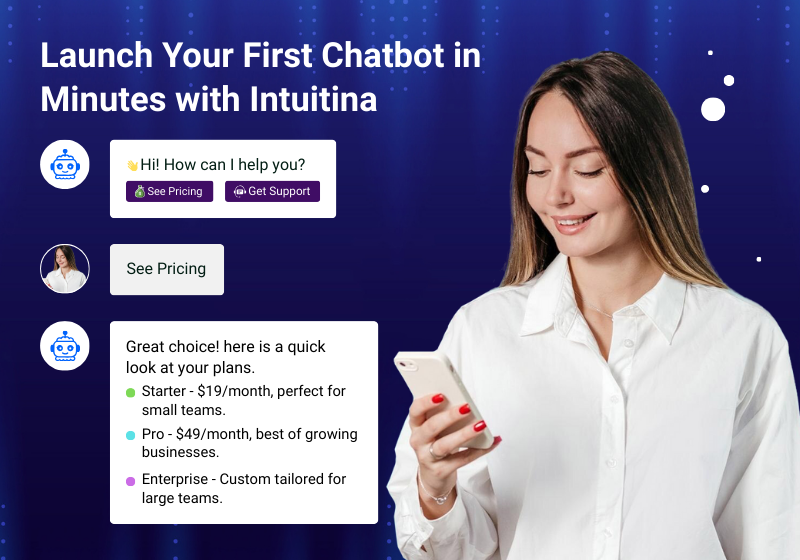
Many people believe chatbots require coding skills, long timelines, or a dedicated dev team. In reality, the barriers have dropped drastically. No-code platforms and drag-and-drop tools let non-technical users launch functional chatbots quickly.
These tools provide visual flows and prebuilt templates so what used to take weeks can now take minutes.
Example: With some no-code builders, users report having a working bot handling basic tasks just 5–10 minutes after signup.
Steps to Launch Your First Chatbot, Quickly
Here are the streamlined steps you should follow to get a chatbot up and running fast. Each step is simple enough for someone without a tech background.
- Define the Purpose & Key Use Case
Decide exactly what you want the bot to do (e.g., lead capture, answering FAQs, guiding visitors). The more concrete this is, the faster you can build. - Choose a No-Code Platform
Look for platforms that offer drag-and-drop flow builders, visual canvas, templates, and easy deployment. Make sure they integrate with your website or CMS. - Pick or Customize a Template
Start with a ready-made template close to your use case (support bot, lead bot, product recommendation). Customize greetings, options and questions. - Design Conversational Flows Visually
Using drag and drop, you map out what the user sees first, the follow-up questions and paths for common queries or needs. - Add Personality & Branding
Adjust the bot’s tone, message style, visuals (widget appearance), and any branding to make the interaction feel like part of your website or brand. - Test before Go-Live
Simulate conversations, try edge cases (things users might say unexpectedly), check that integrations (if any) work, and ensure the bot leads to the right follow-ups. - Deploy, Monitor & Iterate
Publish the bot (usually via script/embed or plugin). Monitor usage and feedback. Make small improvements based on real chats—update flows, tweak wording, add missing options.
What Modern Chatbot Builders Usually Provide
To enable quick deployment, many no-code chatbot builders include features like:
- Visual drag-and-drop flow editors (so you don’t need to write code).
- Pre-built conversation templates tuned for common use cases (lead generation, customer support, product suggestions).
- Integrations with existing tools (CRMs, help desk software, website platforms).
- Easy deployment methods (embed code snippets, website widget, plugin).
- Analytics or dashboards to track usage, drop-offs, and performance of different paths.
How Intuitina Lets You Go from Zero to Chatbot in Minutes
Here’s how Intuitina’s no-code / drag-and-drop-based system makes launching fast, plus a real example:
- Auto-Generated Starter Bot: You provide your website URL or base content (FAQ, product pages), and Intuitina generates a starter bot you can immediately tweak—less time spent building scaffolding.
- Flow Builder UI: Intuitina offers a visual flow editor where you just drag blocks (greeting, question, branching) and link them without writing code.
- Templates for Common Scenarios: Whether you need a lead-capture bot, support bot, or product recommendation flow, there are ready templates you can customize.
- Easy Deployment: Once built, you embed the chatbot via a small code snippet or plugin, no need for complex setup.
- Real-time Testing & Feedback: Before full deployment, you can preview conversations, test typical and edge interactions, and iterate based on what you observe.
- Continuous Improvement: After launch, Intuitina gives you data on how users interact (which flows are most used, where users drop off), so you can refine conversation flows, tone, and content.
Example in Practice: A small SaaS company wanted to automate demo scheduling + lead qualification. With Intuitina, they used a template, tweaked the questions (budget, timeline), deployed to their site, and had their first qualified leads coming through within 15 minutes of launch.
Challenges You Might Face & How to Solve Them
Launching quickly is great, but there are a few pitfalls. Here are some common ones, and how to avoid them:
- Overcomplicating the first version
Trying to cover every possible question or use case makes setup slow. Start with a minimal viable chatbot that covers your core needs, then expand. - Poor content quality or flow logic
If the script doesn’t feel natural or misses obvious user responses, users get frustrated. Use simple language, map likely user intents, include fallbacks (“I didn’t understand, can you rephrase?”). - Neglecting testing
If you don’t test well, you might launch with broken flows or confusing messages. Always simulate, get external feedback, test unexpected inputs. - Ignoring analytics after launch
Without data, you won’t know where visitors are dropping off or which paths work best. Use the analytics tools to iterate.
Tips to Speed Up Your Bot Launch (Drag-Drop Hacks)
Launching your first chatbot doesn’t have to be overwhelming. By following a few practical shortcuts, you can go from idea to deployment faster while still maintaining quality. These hacks are especially helpful for small teams that need results quickly.
- Start with Templates Instead of Blank Screens
Most no-code platforms, including Intuitina, come with ready-to-use templates for common use cases like lead generation, customer support, or FAQs. Instead of reinventing the wheel, select a template that matches your goal and tweak the language or flow to fit your brand. This can cut your setup time by more than half. - Reuse Conversation Blocks Across Flows
Create reusable blocks for greetings, fallback responses, or standard questions (like collecting email or phone numbers). Once built, these can be dropped into any new flow. Over time, you’ll build a library of components that make new chatbot projects dramatically faster. - Keep Conversation Trees Shallow in the First Version
A common mistake is building deep, branching flows with dozens of paths before testing. Instead, start simple—two or three main paths that cover the majority of visitor intentions. This allows you to launch quickly and expand based on actual user behavior. - Prepare Copy and Branding in Advance
One of the biggest time sinks isn’t the technology—it’s writing natural conversation text and aligning the bot’s tone with your brand. Draft core messages (greeting, fallback, thank-you) in advance so you can drop them in quickly. - Collaborate with Non-Technical Teams Early
Marketing or sales teams often know the customer journey better than developers. Involve them when designing flows—they’ll suggest which questions to ask and how to phrase them, saving you time on revisions later. - Polish Design Later, Not First
Don’t get stuck customizing colors, fonts, or button shapes before the bot even works. Focus on functionality first, then return to polish the visual design after launch. Early feedback from users will guide which design changes matter most.
Why Fast Deployment Matters
Speed isn’t just about convenience—it directly impacts your bottom line. Launching quickly means you can start capturing leads, answering questions, and improving customer experiences right away. Waiting weeks or months to roll out a bot means lost opportunities and slower growth.
- Capture Attention While It’s Hot
Visitors spend seconds deciding whether to stay on your website. If your chatbot is live, it can greet them instantly, guide them to what they need, and prevent them from bouncing. A delayed launch means you miss those fleeting windows of opportunity. - Outpace Your Competition
In many industries, being first to adopt conversational AI can be a differentiator. If your competitors still rely on static forms, you’ll win by offering faster, friendlier interactions. Speed of deployment can give you an edge in customer satisfaction and conversions. - Get Real Data Sooner
You can’t improve what isn’t live. Launching quickly gives you access to conversation analytics—what users are asking, where they drop off, and which flows drive conversions. This data is gold for optimizing both your chatbot and your broader marketing strategy. - Iterate Without Fear
A chatbot doesn’t have to be perfect on day one. By deploying fast, you can treat your first version as a live experiment. Each week, you gather insights and improve, creating a cycle of continuous growth instead of waiting months for a “finished” product. - Shorten the Path to ROI
The sooner your chatbot is live, the sooner it can generate leads, reduce support tickets, or drive sales. Quick deployment accelerates your return on investment—turning the chatbot from a project cost into a revenue driver in record time.
Frequently Asked Questions
Q: Do I need technical knowledge to launch a chatbot using Intuitina?
No. Intuitina is designed for non-technical users. The drag-and-drop interface, templates, and starter content let you build flows without code.
Q: How long will it realistically take to get a working chatbot on my site?
For basic use cases (like lead capture or FAQ answering), you can get a working bot in under 15 minutes. More complex flows will take longer.
Q: Can I integrate the chatbot with my existing tools (CRM, email, etc.)?
Yes — Intuitina supports integrations so that data from your bot (leads, user context) can flow into your CRM, marketing tools, or email workflows.
Q: What if users ask things outside my planned flow?
Include fallback responses and options to escalate (e.g. ‘connect to human’, ‘ask for more info’). Over time, review analytics to expand the bot’s understanding.
Conclusion
You don’t need a coding background or weeks of waiting to launch a chatbot. With modern tools and platforms like Intuitina, you can drag, drop, and deploy a fully functioning bot in minutes. Start small, test fast, learn from real conversations, and evolve your chatbot gradually.
If you’re ready, you can set up your first bot now with Intuitina — no coding, no stress.